Monetizing Cloudflare Worker APIs with Coinbase CDP x402
The Engineering Guide
Summary: A practical guide to monetizing Cloudflare Worker APIs and MCP tools on Base Mainnet using Coinbase CDP x402, Permit2 signatures, and dual-layer interception.
Building a web service where humans generate basic raster QR codes for free while autonomous AI agents pay microtransactions for vector SVGs exposes an immediate architectural challenge: standard web stacks expect session cookies or OAuth tokens, whereas AI agents require frictionless, programmatic micropayments. The x402 protocol solves this by bringing native 402 Payment Required HTTP headers to HTTP APIs and Model Context Protocol (MCP) endpoints.
Transitioning from a testnet sandbox to Base Mainnet using the Coinbase CDP Facilitator reveals strict cryptographic constraints, unparsed key formats, and on-chain contract signature expectations that bypass traditional documentation. This guide details how to configure Cloudflare Worker Edge runtimes, bypass V8 cryptographic limitations, enforce Permit2 transfers, and implement dual-layer payment interception for AI agents.
Architecture & Mental Model
The monetization layer protects premium endpoints by requiring micropayments settleable on Base Mainnet or Solana. When an unauthenticated request arrives at the protected endpoint, the server halts execution, computes the payment requirements, and returns a 402 Payment Required challenge.
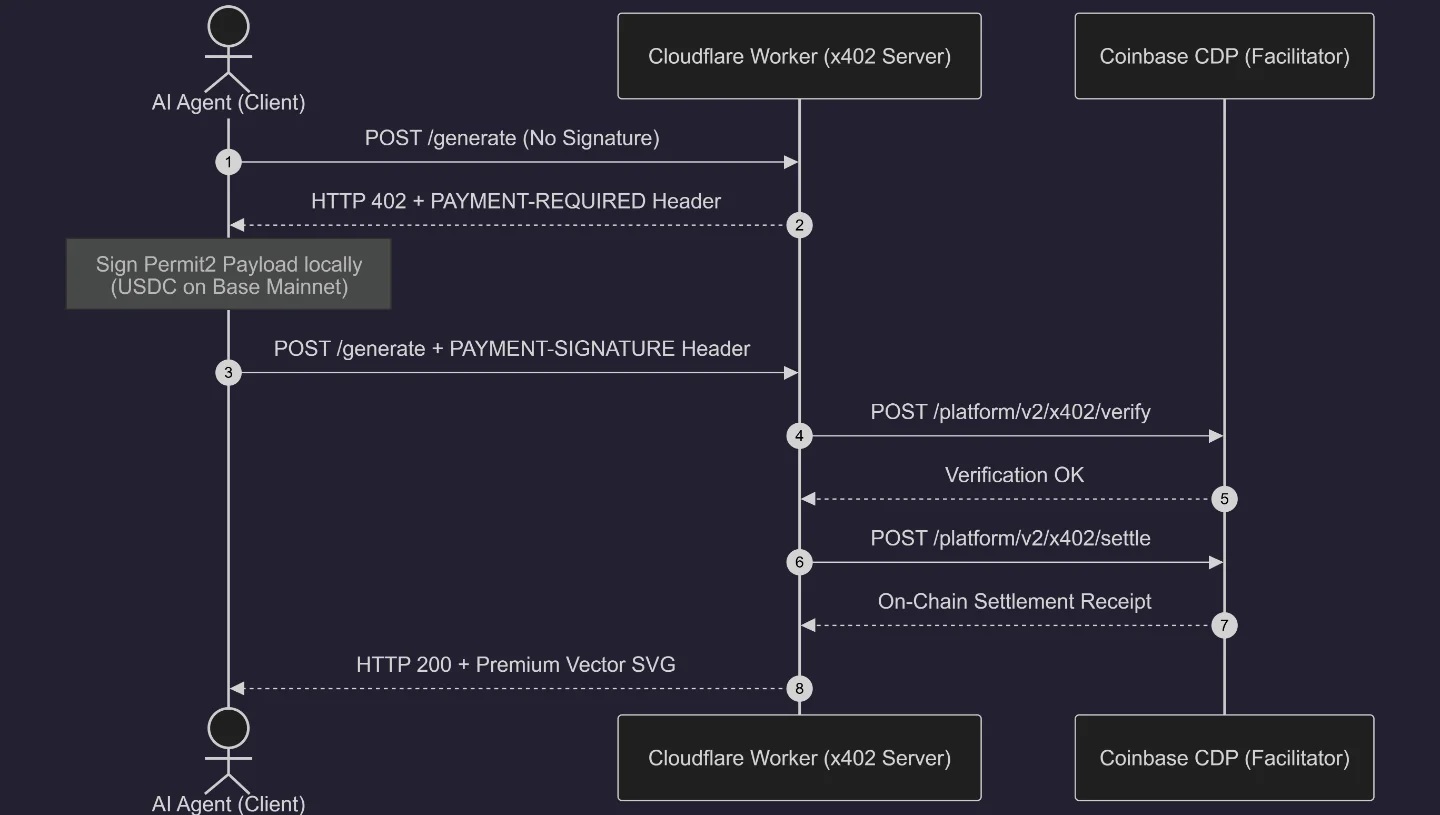
Prerequisites & Environment Configuration
Cloudflare Workers execute inside V8 isolates rather than standard Node.js runtimes. Cryptographic primitives within @x402/evm and @solana/keys rely on Node.js built-ins (crypto, events, Buffer). You must enable Node.js compatibility flags in your wrangler.toml configuration:
compatibility_date = "2024-09-23"
compatibility_flags = [ "nodejs_compat" ]
Dashboard Secrets
Configure the following variables in the Cloudflare Dashboard:
X402_NETWORK_MODE: mainnetX402_PAYTO_EVM: Your seller wallet address receiving USDC on Base (e.g., 0x...).X402_PAYTO_SOL: Your Solana seller wallet address.CDP_API_KEY_NAME: The identifier string from your Coinbase CDP API Key.CDP_API_KEY_PRIVATE_KEY: The raw 64-byte base64 private key string from cdp_api_key.json.
Step 1: Forcing Permit2 Signature Constraints
The @x402/evm client defaults to older EIP-3009 (TransferWithAuthorization) signature formats. When submitted to the Coinbase CDP Facilitator, EIP-3009 signatures fail during on-chain settlement because Coinbase executes settlements directly through the Permit2 smart contract (0x000000000022D473030F116dDEE9F6B43aC78BA3) on Base Mainnet.
An EIP-3009 payload targets the USDC token contract domain separator directly, using TransferWithAuthorization as its primary type. When Permit2 processes this mismatched data structure, EVM address recovery returns an invalid signer, causing the contract to execute a REVERT opcode. Coinbase surfaces this as an invalid_payload: contract call failed: execution reverted error.
To prevent this, you must explicitly declare assetTransferMethod: "permit2" within the accepts.extra configuration block of your server's payment requirements.
export interface X402Env {
  X402_NETWORK_MODE?: string;
  X402_PAYTO_EVM: string;
  X402_PAYTO_SOL: string;
  CDP_API_KEY_NAME: string;
  CDP_API_KEY_PRIVATE_KEY: string;
}

export function getPaymentRequirements(env: X402Env) {
  const isProd = env.X402_NETWORK_MODE === "mainnet";
  const evmAddr = env.X402_PAYTO_EVM || "0x0000000000000000000000000000000000000000";
  const solAddr = env.X402_PAYTO_SOL || "11111111111111111111111111111111";

  const evmNetwork = isProd ? "eip155:8453" : "eip155:84532"; // Base Mainnet vs Sepolia
  const solNetwork = isProd
    ? "solana:5eykt4UsFv8P8NJdTREpY1vzqKqZKvdp"
    : "solana:EtWTRABZaYq6iMfeYKouRu166VU2xqa1";

  const evmAsset = isProd
    ? "0x833589fCD6eDb6E08f4c7C32D4f71b54bdA02913" // Base USDC
    : "0x036CbD53842c5426634e7929541eC2318f3dCF7e";

  return {
    x402Version: 2,
    accepts: [
      {
        scheme: "exact",
        price: "$0.001",
        amount: "1000", // 0.001 USDC (6 decimals)
        network: evmNetwork,
        payTo: evmAddr,
        asset: evmAsset,
        maxTimeoutSeconds: 300,
        extra: {
          name: "USDC",
          version: "2",
          assetTransferMethod: "permit2",
        },
      },
      {
        scheme: "exact",
        price: "$0.001",
        amount: "1000",
        network: solNetwork,
        payTo: solAddr,
        maxTimeoutSeconds: 300,
      },
    ],
    description: "Premium Vector SVG QR Generation & Custom Styling",
    mimeType: "application/json",
  };
}
Step 2: Bypassing ASN.1/PEM Parsing Bugs with jose
Authenticating with Coinbase CDP requires sending a signed Ed25519 JSON Web Token (JWT). Standard cryptographic engines like node:crypto expect private keys wrapped in standard ASN.1 structures (PEM or DER) containing headers like -----BEGIN PRIVATE KEY-----.
Coinbase CDP provides API keys as naked 64-byte base64 strings. Passing this naked string into node:crypto.createPrivateKey() triggers low-level parser failures. The jose library circumvents ASN.1 parsing entirely by constructing an explicit JSON Web Key (JWK) directly from raw byte arrays.
import { importJWK, SignJWT } from "jose";

export async function generateCdpJwt(
  keyName: string,
  privateKeyBase64: string,
  requestPath: string
): Promise<string> {
  const now = Math.floor(Date.now() / 1000);
  const nonce = crypto.randomUUID().replace(/-/g, "");

  const decoded = Buffer.from((privateKeyBase64 || "").trim(), "base64");
  const seed = decoded.subarray(0, 32);
  const publicKey = decoded.subarray(32);
  const jwk = {
    kty: "OKP",
    crv: "Ed25519",
    d: seed.toString("base64url"),
    x: publicKey.toString("base64url"),
  };

  const key = await importJWK(jwk, "EdDSA");
  const uri = `POST api.cdp.coinbase.com/platform/v2/x402/${requestPath}`;
  return await new SignJWT({
    iss: "cdp",
    sub: keyName,
    uris: [uri],
  })
    .setProtectedHeader({ alg: "EdDSA", kid: keyName, typ: "JWT", nonce })
    .setIssuedAt(now)
    .setNotBefore(now)
    .setExpirationTime(now + 120)
    .sign(key);
}
Step 3: Verification & Settlement Middleware
Protected endpoints must evaluate incoming requests for the payment-signature header. If absent, the server emits the 402 Payment Required challenge. When present, the server verifies the signature, settles the payment on-chain, and executes the core logic.
app.post("/generate", async (c) => {
  const env = c.env;
  const paymentSig = c.req.header("payment-signature");
  const reqs = getPaymentRequirements(env);

  if (!paymentSig) {
    c.header("PAYMENT-REQUIRED", getEncodedPaymentRequiredHeader(env));
    return c.json({ error: "Payment Required" }, 402);
  }

  const payload = decodePaymentSignatureHeader(paymentSig);
  const server = createResourceServer(env);

  const matchingReq = server.findMatchingRequirements(reqs.accepts, payload) || reqs.accepts[0];
  const verification = await server.verifyPayment(payload, matchingReq);

  if (!verification.isValid) {
    c.header("PAYMENT-REQUIRED", getEncodedPaymentRequiredHeader(env));
    return c.json({ error: `Verification Failed: ${verification.invalidReason}` }, 402);
  }

  const settlement = await server.settlePayment(payload, matchingReq);
  c.header("PAYMENT-RESPONSE", encodePaymentResponseHeader(settlement));

  const body = await c.req.json();
  const svgOutput = await generateVectorQR(body.text, body.styleOptions);

  return c.json({ success: true, result: svgOutput });
});
Step 4: Dual-Layer MCP Interception Mechanics
An MCP endpoint serving AI agents must handle payment challenges across varying client architectures. The endpoint supports both transport-level headers and structured JSON-RPC error bodies concurrently.
app.post("/mcp", async (c) => {
  const env = c.env;
  const paymentSig = c.req.header("payment-signature");
  const body = await c.req.json();

  const isPaidRequest = body.method === "tools/call" &&
                        body.params?.name === "generate_qr_code" &&
                        body.params?.arguments?.format === "svg";

  if (isPaidRequest && !paymentSig) {
    const encodedHeader = getEncodedPaymentRequiredHeader(env);
    const rawReqs = getPaymentRequirements(env);
    c.header("PAYMENT-REQUIRED", encodedHeader);
    return c.json({
      jsonrpc: "2.0",
      id: body.id || "1",
      error: {
        code: 402,
        message: "Payment Required ($0.001 USD via x402 for vector SVG export)",
        data: { x402: rawReqs }
      }
    }, 402);
  }

  return handleMcpExecution(c, body, paymentSig);
});
Step 5: Testing, Self-Sending Limits & Permit2 Authorization
Validating local test setups introduces operational edge cases that can halt settlement:
WARNING: Self-Sending Prevention — The buyer wallet generating payment signatures cannot match the seller destination address (X402_PAYTO_EVM). Supplying matching addresses causes Coinbase CDP to reject settlement with a self_send_not_allowed error.
CAUTION: Permit2 Approval Requirement — The buyer wallet must execute an on-chain ERC-20 approve transaction authorizing the Permit2 contract (0x000000000022D473030F116dDEE9F6B43aC78BA3) to spend its USDC. Skipping this step causes the contract to revert during settlement.
const hash = await client.writeContract({
  address: BASE_USDC,
  abi: parseAbi(["function approve(address spender, uint256 amount) returns (bool)"]),
  functionName: "approve",
  args: [PERMIT2_CONTRACT, MAX_UINT256],
});
Step 6: Exposing Discovery Metadata for the x402 Bazaar
To enable automatic indexing by the Coinbase x402 Bazaar, your server must expose a strict schema. The Bazaar indexer looks for this schema in two places:
- Your global
/.well-known/x402directory. - The
HTTP 402 Payment Requiredresponse of the actual paid endpoint (crucial for auto-discovery when AI Agents make transactions).
First, let's define your schema in a central file so it can be shared:
export const BAZAAR_EXTENSIONS = {
  bazaar: {
    discoverable: true,
    info: {
      input: {
        type: "http",
        method: "POST",
        bodyType: "json",
        body: {
          myParameter: "example_value"
        },
      },
    },
    schema: {
      $schema: "https://json-schema.org/draft/2020-12/schema",
      type: "object",
      properties: {
        input: {
          type: "object",
          properties: {
            body: {
              type: "object",
              properties: {
                myParameter: {
                  type: "string",
                  description: "A description of this parameter"
                }
              },
              additionalProperties: true,
              required: ["myParameter"]
            }
          }
        }
      }
    }
  }
};
Next, update your /.well-known/x402 endpoint to use the valid resources and extensions fields:
import { BAZAAR_EXTENSIONS } from "../utils/x402";
app.get("/.well-known/x402", (c) => {
  const env = c.env;
  const baseRequirements = getPaymentRequirements(env);
  return c.json({
    x402Version: 2,
    name: "my x402 project",
    description: "my service description",
    homepage: "https://example.com",
    // ⚠️ Note: It MUST be 'resources', not 'services'
    resources: [
      {
        url: "https://example.com/do_something",
        type: "http",
        description: "do something",
        accepts: baseRequirements.accepts,
        // ⚠️ Include the Bazaar schema here
        extensions: BAZAAR_EXTENSIONS
      }
    ]
  });
});
Finally, ensure your API endpoint includes this exact same extensions block when returning a 402 Payment Required challenge. If this is missing from the 402 response, the Coinbase Facilitator will not index your endpoint when AI agents pay for it!
export function getPaymentRequirements(env: Env, resourceUrl?: string) {
  return {
    x402Version: 2,
    accepts: [ /* ... */ ],
    description: "my service description",
    mimeType: "application/json",
    // ⚠️ CRITICAL FOR AUTO-DISCOVERY
    extensions: BAZAAR_EXTENSIONS,
    ...(resourceUrl ? { resource: { url: resourceUrl } } : {}),
  };
}