How I Built an Invisible Telegram CRM
for My Girlfriend's Nail Studio on Cloudflare Workers, D1, and KV
A few months ago, my girlfriend Anna started running into a bottleneck that hits almost every solo service business: managing client bookings manually over personal chat was eating up hours of her day.
Instead of signing up for an off-the-shelf booking SaaS with clunky external forms or hacking together an expensive LLM bot, I built a lightweight, serverless CRM that runs directly inside Telegram Business. It uses Cloudflare Workers, D1 (edge SQLite), KV, and a vanilla TypeScript Mini App.
The system processes bookings deterministically in under a millisecond, costs practically zero to run, and works silently inside normal client conversations without slash commands or bot menus.
The Real-World Friction: Lost Leads, Ghost Clients, and Calendar Juggling
On paper, running a private manicure studio is simple: do great nails, get booked, get paid. In reality, handling bookings through direct messages gets messy fast.
When you run local ads, inquiries land at all hours. People message asking for prices or open dates while Anna is in the middle of a 3-hour gel set, working out, or asleep. When an inquiry sits unanswered for two hours, potential clients just move to the next salon on Instagram. If you're paying for traffic, slow response times directly burn your ad budget.
Once a conversation starts, two bigger headaches appear:
- Constant Context Switching: Scheduling meant constantly jumping out of Telegram into Google Calendar, checking open slots, typing out times, waiting for replies, hopping back to block the slot, and setting manual reminders. Doing this across 20+ active chats a day destroys your focus.
- The "Ghost Client" Problem: Telegram lets users wipe entire chat histories for both sides with a single tap. Problematic clients would book prime Saturday slots, no-show, and immediately delete the chat. Two weeks later, they'd message again as if nothing happened. Because the conversation history was gone, Anna had no way to track repeat offenders.
The initial plan was modest: set up a quick auto-responder to send a price list photo album when Anna was away so new leads wouldn't bounce.
Once I started digging into the Telegram Business API, though, I realized we could do much more. We could turn the bot into an invisible assistant that sits directly on top of her normal conversations—logging client history, detecting double-bookings, and rendering an in-app daily schedule.
How Telegram Business Connected Bots Change the UX
Most Telegram bots require clients to search for a bot handle (@my_salon_bot), click Start, and tap through interactive menus. That works for large businesses, but for a private service master, it feels impersonal. Clients want to feel like they are talking directly to the artist.
With Telegram Business Connected Bots, the integration connects directly to Anna’s personal Telegram account.
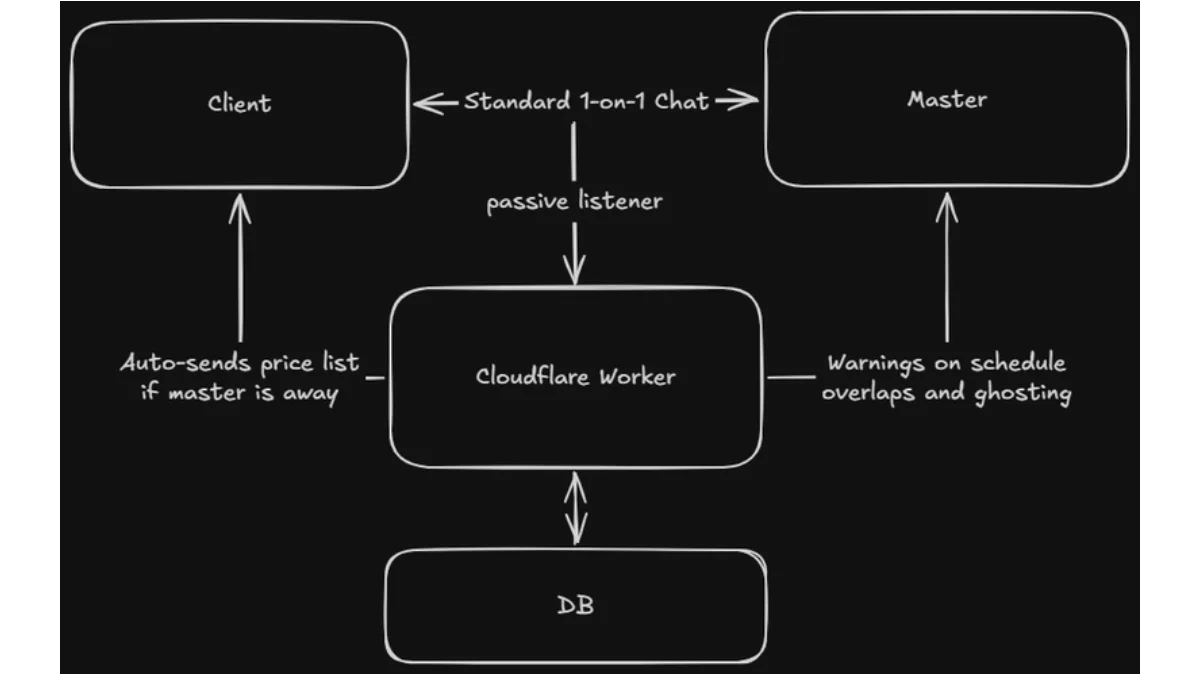
From the client's perspective, it's just a normal conversation with Anna. Behind the scenes, the Cloudflare Worker intercepts incoming webhook events to handle the background logic:
- If a new lead asks for pricing while Anna is busy, the bot automatically drops a friendly greeting and the price list.
- When Anna types a routine confirmation like "Booked for tomorrow at 3:00 PM, manicure with removal, 2.5h, $55", the bot parses the message, creates a database record, checks for calendar overlaps, and calculates her rest window.
- The client never sees command prompts, raw bot messages, or awkward third-party links.
Architectural Separation: Relational Storage (D1) vs. Ephemeral State (KV)
A common mistake with chat automations is trying to shove everything into a single database, or relying entirely on in-memory state that disappears whenever a serverless container spins down.
Pairing Cloudflare D1 with Cloudflare KV gives a clean split based on data lifecycle:
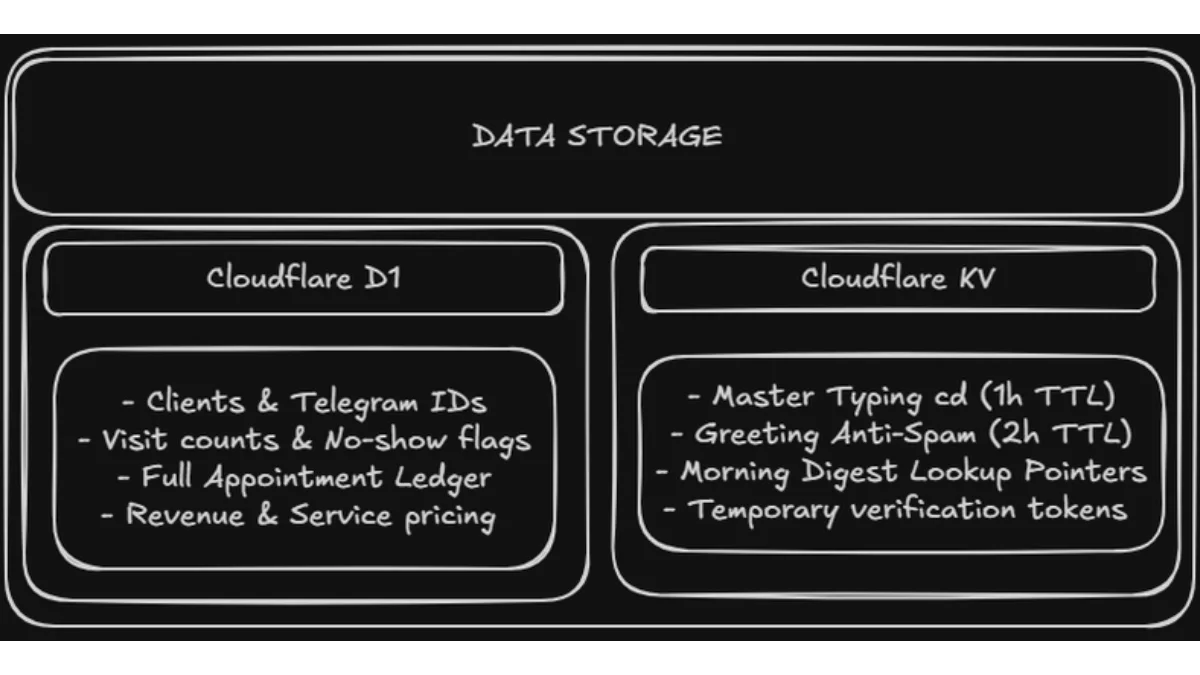
1. Cloudflare D1 for Persistent CRM History
D1 holds everything that must persist indefinitely:
- Client Records: Maps immutable Telegram user IDs to names, phone numbers, lifetime spend, visit counts, and no-show flags. Even if a client wipes the chat history, their record in D1 remains untouched. If a serial no-show reaches out again, the bot immediately flags them in Anna’s private notes so she can require a 50% non-refundable deposit.
- Appointment Ledger: Stores timestamps, durations, services, prices, payment methods, and statuses (
CONFIRMED,PENDING_REMINDER,NO_SHOW,COMPLETED). - Config & Media Cache: Stores working hours, buffer preferences, and cached Telegram
file_idstrings so the bot doesn't waste bandwidth re-uploading media over webhooks.
2. Cloudflare KV for Ephemeral Coordination
KV handles short-lived state where built-in Time-To-Live (TTL) auto-expiration eliminates the need for cleanup jobs:
- Active Master Cooldown (
interaction:{chatId}:ANYA_ACTIVITY, 1-hour TTL): Whenever Anna sends a manual message in any chat, the Worker writes this key. For the next 60 minutes, the bot stays completely quiet in that chat. This guarantees the bot never talks over Anna while she is actively texting a client. - Anti-Spam Throttling (
interaction:{chatId}:GREETING, 2-hour TTL): Prevents duplicate greeting messages if an undecided client sends four short texts in a row. - Live Digest Pointers (
appt_digest_key:{apptId}, 12-hour TTL): When the morning reminder cron runs, it maps each appointment ID back to a single summary message sent to Anna's private chat. When a client confirms via button, the Worker updates the existing summary message in place instead of spamming her with new notifications.
Deterministic Parsing: Why I Skipped LLMs
When developers hear "parse natural language chat messages," the default reaction is to reach for OpenAI or Claude. For this use case, calling an LLM on every incoming message was the wrong move:
- Cost: Running an LLM across every message in dozens of active chats adds up fast.
- Latency: External LLM calls add 1 to 3 seconds of overhead.
- Reliability: Generative models can hallucinate dates, drop numbers, or subtly misinterpret prices.
Because booking confirmations follow predictable phrasing, the parser runs entirely on deterministic regex and simple date arithmetic inside the Worker in under 1 millisecond.
1. Affirmative Verb Gating
To make sure the bot doesn't accidentally record a booking when Anna is just discussing availability, the parser requires an affirmative confirmation keyword (e.g., Booked, Scheduled, Reserved, Set).
Phrases containing exploratory words (can do, open slots, what time works) are ignored.
2. Time, Date, and Duration Normalization
The parser handles conversational variations:
- Times: Converts standard 24h formats (
15:30,14.00) as well as relative conversational hours (turning afternoon single digits like3or5into15:00and17:00, while preserving10and11as morning slots). - Dates: Resolves relative terms (
today,tomorrow,day after tomorrow), ordinal suffixes (26th,28th), and weekdays (this Friday,next Monday). - Durations: Extracts explicit values (
2.5h,2h 30min,90 min), falling back to default durations per service. - Pricing: Normalizes mixed notation (
$55,55$,55 usd,55 bucks, or raw numbers like55) into clean integer values.
Overlap Detection and Break Calculations
Once an appointment is parsed, the engine checks whether the slot conflicts with existing bookings and calculates the downtime between clients.
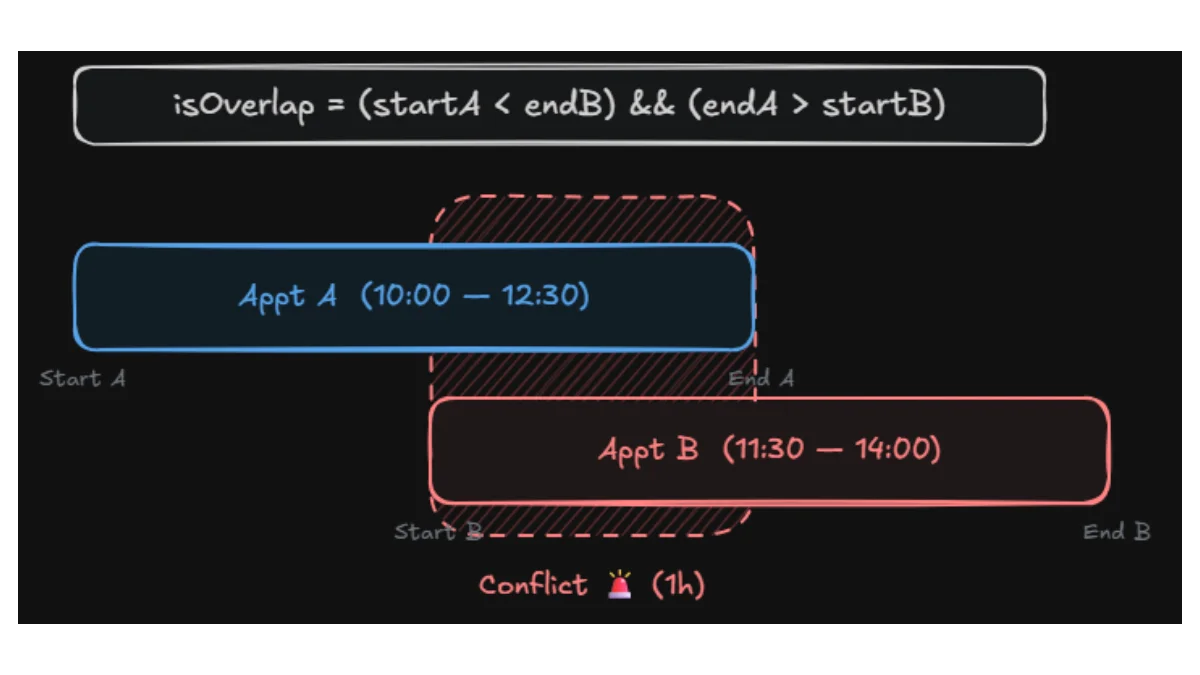
If an overlap is detected, the Worker sends an alert directly to Anna's private chat:
🚨 WARNING: Time overlap with Client A (11:00 AM - 1:30 PM)!If the slot is clear, it calculates the rest gap until the next client. If that gap matches or exceeds her buffer setting (e.g., 30 minutes), it logs the confirmation:
✅ Booking saved: August 26 at 2:15 PM. ☕ Rest window until next client: 45 min.In-Chat Timeline via Telegram Mini App
To eliminate switching between Telegram and Google Calendar, Anna can open her full daily schedule directly inside Telegram via a lightweight Mini App.
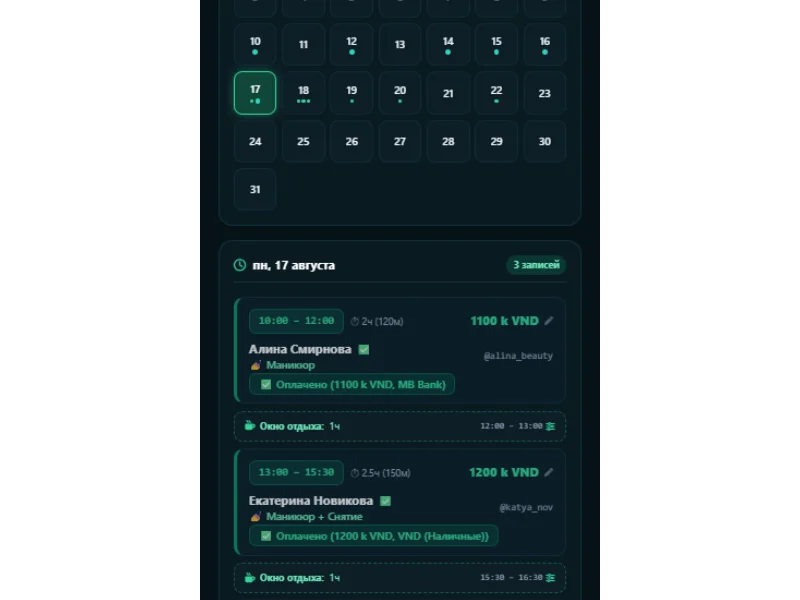
Instead of bringing in React, Vue, or build tooling, the Mini App is a single-file TypeScript template. The HTML, CSS, and client-side JS are inlined straight into Worker memory and served as a cached single-page app (/app).
- CSS Grid Timeline: A clean vertical grid for the day (08:00 to 22:00).
- Dynamic Offsets: Minimal vanilla JS calculates the exact pixel height and top margin for appointment blocks based on start time and duration.
- Authentication: Requests pass
window.Telegram.WebApp.initData. The Worker verifies the HMAC-SHA256 signature against the bot token, ensuring only Anna can access the view.
Interactive 24-Hour Reminders with In-Place Updates
Checking next-day appointments and texting reminders used to take 20 minutes every morning. Now, a Cloudflare Cron Trigger runs daily at 11:00 AM local time (0 4 * * * UTC).
Client Reminders
The cron pulls confirmed bookings for the next day and sends interactive inline buttons to each client:
"Hi! Just reminding you about our appointment tomorrow (August 18) at 2:00 PM for Manicure + Removal 💅"[ ✅ I will be on time ] [ 🔄 Reschedule ] [ ❌ Can't make it ]
Updating the Daily Digest Without Notification Spam
When reminders go out, the bot also sends Anna a consolidated morning digest:
📅 Tomorrow's Schedule (August 18):❓ 10:00 AM — Alina (Manicure + Removal) (Waiting for reply)❓ 2:00 PM — Katya (Pedicure) (Waiting for reply)
The Worker saves this digest to KV (daily_digest:{timestamp}) and creates pointer keys for each appointment (appt_digest_key:{apptId}).
When a client taps [ ✅ I will be on time ]:
- The webhook reads
appt_digest_key:{apptId}to find the message ID. - It flips that client's icon from
❓to✅. - It calls Telegram’s
editMessageTextAPI to update the digest message in place.
Anna can check her morning summary at any point during the day and see real-time updates without her phone buzzing every time someone confirms.
External Calendar Sync with ETag Caching
For instances where Anna wants her schedule synced to a desktop calendar app, the Worker exposes an RFC 5545 .ics feed over webcal://.
External calendar clients poll feeds aggressively, which can trigger unnecessary D1 reads. To keep overhead minimal, the endpoint generates an ETag based on the active booking count and the most recent modification timestamp:
ETag: "{appointmentCount}_{latestModifiedTimestamp}" (e.g. "14_1723982400000").
When a client polls with a matching If-None-Match header, the Worker immediately responds with 304 Not Modified, skipping data serialization and body transfer completely.
Wrap-Up
Building this setup reinforced a few practical rules for indie edge tools:
- Keep users in their existing workflow: Building on top of Telegram Business meant Anna and her clients didn't have to learn a new app or deal with third-party booking portals.
- Right tool for the right lifespan: D1 handles permanent relational records (clients, revenue, history), while KV handles short-lived state (cooldowns, message pointers) with zero manual cleanup.
- Don't overcomplicate with AI when deterministic rules work: A few well-crafted regex patterns run in under a millisecond, cost nothing, and don't hallucinate dates or prices.
- Lean frontends on the edge: Serving vanilla TypeScript and CSS straight from edge memory gives sub-100ms load times without managing client-side build pipelines.